In this post I’ll tell you about my approach to structuring source code files in my projects. I called it AZ-structuring. This approach works for programming languages where source code is stored as many files in a filesystem (like Java, PHP, JavaScript/nodejs).
Premise
First of all, I want to talk about the reason that prompted me to use this structuring. The reason is refactoring.
“Code is read much more often than it is written.”© Guido van Rossum
Paraphrasing Guido we can say:
Code is changed much more often than it is written from scratch.
I don’t write code for NASA missions, I’m a web developer. There are some areas in software development where waterfall methodology is the only model that can be used (like NASA missions, for example).
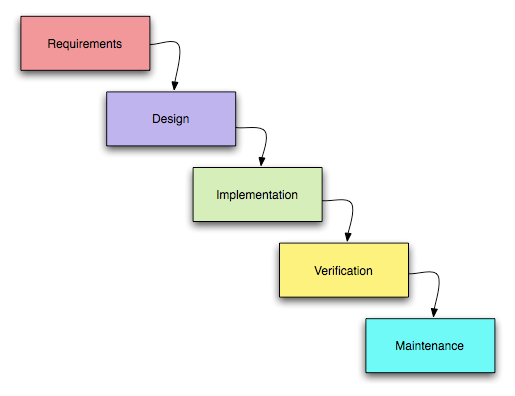
The waterfall model.
We have one only attempt to land a probe on the ground and any error can be fatal.
Web development is different. In the beginning we often do not have a clear idea of what we want to get at the end. We see only the direction of development but not all the details. The spiral model is used for such cases:
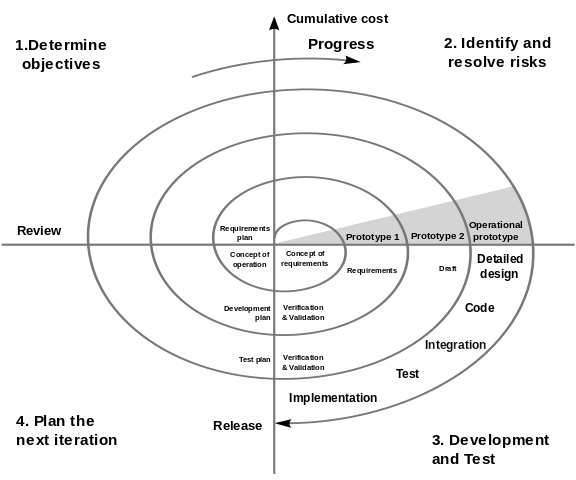
The spiral model.
The cost of errors is not as critical in web projects as in NASA projects and we can develop by trial and error here. That is, we will refactor our code at each iteration — add, remove and change. Refactoring is a common process in web development.
Boundaries
The main problem with refactoring, at least for me, is how to define the boundaries of change propagation. These boundaries are old problem and OOP (introduced over 50 years ago) is one of the attempts to solve the problem. Encapsulation — it’s just about that.
Modern web projects contain hundreds of thousands of files. To be precise, they consist of packages, which consist of files. Some of the files are only used within their package, some are used by other files in other packages. We need to know where the file we will change is used. How freely we can change the signature of a method or function.

JavaScript is my active programming language at the moment, so I will be giving examples in that language (EcmaScript 6+) in this post.
In fact, I can freely change the code that does not go outside the file
(is not the subject of an export statement). The code exported by the
es6-module may be used anywhere in the project. Or maybe not. When I
create an npm-package for use in projects (my own or external), I can
describe what code I consider public (in
main or
export). The rest of the
code is considered to be private to my package. When refactoring such
code, I only need to worry about the calling code within the package
itself. If someone used my “private” code from his npm-package —
that’s his problem.
But what to do if there is a code in my package whose applicability boundaries should be even smaller? We need to have some set of features that would help us identify such cases and the boundaries of change propagation.
How do we store sources?
Our projects consist of packages managed by packet managers (like
composer or
npm/yarn).
Each package contains everything you need to develop it — sources,
tests, documentation, configuration, etc. Usually, we allocate a
separate directory for sources in our package, for example: ./src/.
The further structure depends on the rules applied in the project. It can be role-based:
src/
  api/
  components/
  helpers/
  pages/
Or feature-based:
src/
  payments/
  products/
  users/
I use mixed rules in my projects: first by role, then by feature:
src/
  Back/Mod/RDb/
  Front/Mod/Store/Ui/
  Lib/Route/Home.mjs
  Shared/Dto/
The first level of separation (by role) depends on the framework used (and on the abstractions of that framework), and the second level — is on the subject area (business tasks). The framework has more stability, but the subject area is changed from project to project.
In a large project we can add more feature levels:
Route/
  Settings/
    Payments.mjs
    Profile.mjs
    Security.mjs
Or even:
Route/
  Settings/
    Payments/
      Payoneer.mjs
      PayPal.mjs
      Wise.mjs
All these files in an (npm-)package have the same
visibility — every file can import another file in general.
In some cases, we can determine boundaries of change propagation based on the role of the file (route, model, controller, helper, …). Usually, we can distinguish two types of boundaries — global & local. Global type means we can use the file anywhere in our package (like helper), and local type — any changes in the file will not affect other files in the package (route).
A-struct
“Programming is a desperate losing battle against the unconquerable complexity of code and the treachery of requirements.” © Jonathan Edwards
We can’t do anything about the treachery of requirements but we can beat the complexity with decomposition. We separate our projects into packages, sources in the package to folders and files - by role, by feature, mixed or smth. else.
Every big snippet of code (file) we can decompose into a set of smaller snippets (files). In some cases, these small snippets have boundaries of change propagation inside the original big snippet only.
For example, suppose a large Settings model is stored here:
Mod/
  Settings.mjs
We can decompose it into a root file and related files:
Mod/
  Settings/
    Payments.mjs
    Profile.mjs
    Security.mjs
  Settings.mjs
Do we have a way to distinguish how many models there are
here — 1 or 5? There is a sign that it is a one model with 4 dependent
snippets — folder ./Settings/ and file ./Settings.mjs. It is very
likely that we can refactor code in ./Settings/ and not worry about
code outside this folder and ./Settings.mjs itself (boundaries of
change propagation).
But what if file structure is already nested? We already have 5 models
(file structure is exactly as above) and we want to decompose a big
model ./Settings.mjs into smaller pieces? How can we mark boundaries
of change propagation?
In my projects I use the ./A/ subfolder for this purpose:
Mod/
  Settings/
    A/
      Snippet1.mjs
      Snippet2.mjs
    Payments.mjs
    Profile.mjs
    Security.mjs
  Settings.mjs
In that case I know that all files in ./Settings/A/ are
pieces of ./Settings.mjs (result of decomposition). Code from root
file ./Settings.mjs can be used anywhere in the package or even
project, but code from ./Settings/A/ can be used in ./Settings.mjs
only. In a way, I define the private part of the code at the file level.
It makes refactoring much easier for me.
If necessary, A-structure can be nested. Here is the path to one of my files in a real project:
…/Route/Settings/A/Profile/A/Password/Change/A/Evt/Change.mjs
Z-struct
There are cases when the dependent code is applied not to one file, but to a group of files — a sort of ’library for a group’. Also with its boundaries of change propagation. In this case I use Z-structuring:
Cli/
  Data/
    Z/
      ListTables.mjs
    Export.mjs
    Import.mjs
    Init.mjs
I know that changes in ./ListTables.mjs do not affect the
code above ./Cli/Data/.
Resume
Embedding ‘private’ scopes in the file structure of the source code makes it possible to more clearly define the boundaries of the propagation of changes, which helps with refactoring of big projects.
If you enjoyed this article, please give it a clap and follow me for more content!
Stay connected:
Thank you for your support!