---
title: "Simulating Interfaces in JavaScript with JSDoc Annotations"
description: "JavaScript, unlike some statically typed languages like TypeScript, does not have built-in support for interfaces. However, as JavaScript applications grow in complexity, the need"
date: 2024-08-07
---
JavaScript, unlike some statically typed languages like TypeScript, does
not have built-in support for interfaces. However, as JavaScript
applications grow in complexity, the need for enforcing a consistent
structure and behavior across different parts of the codebase becomes
increasingly important. Interfaces provide a way to define a contract
that classes or objects must adhere to, ensuring that certain methods
are implemented and promoting code reliability and maintainability. In
this article, we will explore how to simulate interfaces in JavaScript
using JSDoc annotations [@interface](https://jsdoc.app/tags-interface)
and [@implements](https://jsdoc.app/tags-implements),
a practical approach to bring interface-like functionality to your
JavaScript projects.
Frank Martin announced the terms of the contract.
As a starting point, I will take the 2002 movie “[The
Transporter](https://www.imdb.com/title/tt0293662/)”. Frank Martin’s
rules perfectly illustrate how interfaces work and why they are needed.
Frank formulated three simple rules:
1. Never change the deal.
2. No names.
3. Never open the package.
Now anyone who meets Frank’s requirements and has enough money can use
his services.
Let’s transfer now to the JavaScript environment. Imagine that we have
three npm packages:
- **plugin**: performs a certain business function (for example,
delivers parcels)
- **app1**: uses this plugin to process one type of data (delivering a
Chinese girl from Marseille to Nice)
- **app2**: also uses this plugin, but for different data (transporting
a briefcase with explosives from Nice to Grenoble)
Let’s say a useful function is defined in the `plugin`:
``` js
function drive(pack, route) {}
```
Both `app1` and `app2` call this function with different data.
When using interfaces, it is important to understand that in the “*Frank
Martin* — *Customer*” pair, Frank plays the leading role. He sets the
rules. If the Customer does not agree with the rules, he won’t be able
to hire Frank.
In the code, such rules are played by interfaces. I will reflect the
expectations from a parcel in two JS classes:
``` js
/** @interface */
class Package {
getSize() { throw new Error('Implement this method.'); }
getWeight() { throw new Error('Implement this method.'); }
}
/** @interface */
class Route {
getPlaceFrom() { throw new Error('Implement this method.'); }
getPlaceTo() { throw new Error('Implement this method.'); }
}
```
It is possible to describe the interface using only JSDoc annotations,
but my experience shows that modern IDEs do not handle them very well.
That is why I propose using regular JS code and then applying the
`@interface` annotation to it.
Now, Frank’s contract with the Customer looks like this:
``` js
function drive(pack, route) {}
```
For Frank, to be able to deliver the parcel, he has to know the
dimensions and weight of the parcel as well as where to deliver the
parcel from and where to deliver it to.
Then in the first application (delivering a Chinese girl from Marseille
to Nice) the code might look like this:
``` js
function app1() {
const pack = {
getSize: () => ({length: 150, width: 50, height: 50}),
getWeight: () => 50,
};
const route = {
getPlaceFrom: () => 'Marseille',
getPlaceTo: () => 'Nice',
};
drive(pack, route);
}
```
And in the second (delivering a briefcase with explosives from Nice to
Grenoble) the code might look like this:
``` js
function app2() {
const pack = {
getSize: () => ({length: 45, width: 30, height: 10}),
getWeight: () => 1,
};
const route = {
getPlaceFrom: () => 'Nice',
getPlaceTo: () => 'Grenoble',
};
drive(pack, route);
}
```
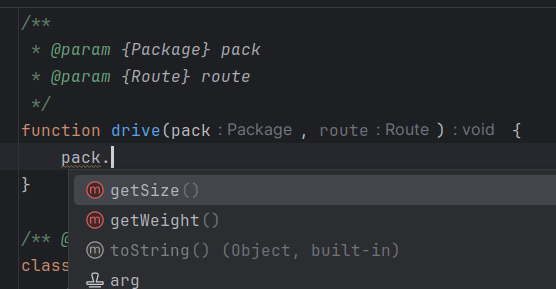
Modern IDEs can already parse such code and use it in autocompletes and
for navigation with Ctrl+Click.
Autocomplete in IDEA
Summarizing everything said above:
- The calling side defines interfaces in the code (sets contract
conditions).
- The caller must comply with the contract.
- Modern IDEs recognize connections between the interface and its
implementations, if JSDoc annotations are used in the code.
Interfaces have proven their usefulness in many other programming
languages. The foundation of creating complex systems is decomposition
into simpler components. Interfaces define the fracture lines
(decomposition) of a complex component into parts. In JS, everything is
already there to use interfaces when developing complex applications.
All you need to implement interfaces in practice is to remember Frank
Martin’s way of doing business: *the rule maker is the one who performs
the task*.
Demo web applications that show the use of interfaces in JS code can be
found here:
- [app1](https://flancer64.github.io/demo-di-if-app1/)
- [app2](https://flancer64.github.io/demo-di-if-app2/)
In these applications, the [@teqfw/di](https://www.npmjs.com/package/@teqfw/di)
library (constructor-based dependency injection) was used to associate
interfaces with their implementations.