---
title: "What is TeqFW?"
description: "TeqFW stands for the Tequila Framework, a web application development framework written in pure JavaScript. It is not a large-scale framework like AngularJS, Laravel, Django, etc.,"
date: 2024-04-29
---
TeqFW stands for the Tequila Framework, a web application development
framework written in pure JavaScript. It is not a large-scale framework
like AngularJS, Laravel, Django, etc., but rather an individual’s
endeavor to create a tool tailored to their specific needs. In the
current landscape of web development, a clear dichotomy has emerged:
backend and frontend development, each with its own coding nuances.
Often, backend and frontend components are coded in different
programming languages, resulting in separate applications interconnected
via APIs and data structures. Consequently, web developers now
categorize themselves into frontend developers, backend developers, and
full-stack developers.
TeqFW is an experiment, a test to see if a single developer can
successfully create web applications for small and medium-sized
businesses. My name is Alex Gusev, and I have been involved in web
application development for about 25 years. Here are the principles I
have based this experiment on.
## One Language to Rule Them All
Certainly, in web development, HTML and CSS are indispensable. However,
when it comes to actual programming, there is only one language for web
programming, and that language is JavaScript. It’s neither Java, nor
PHP, nor Ruby, nor Python, nor Go, nor TypeScript — only JavaScript (and
a bit of WebAssembly).
Personally, I find it challenging to actively use multiple programming
languages and switch between them. There was a time when I was quite
actively programming in LotusScript, Java, PHP, and JS simultaneously.
From my own experience, I know that specializing in one direction
gradually leads to the degradation of skills in others, less used ones.
With the advent of NodeJS, it became possible to write both server-side
and client-side code in JS. Therefore, for me, it became quite logical
to abandon all other programming languages in favor of JS. As Bruce Lee
said, “*I fear not the man who has practiced 10,000 kicks once, but I
fear the man who has practiced one kick 10,000 times*”. Focusing on one
language allows for a better understanding of its philosophy, and as a
result, enables more efficient use of it. Both on the frontend and on
the backend.
## JSDoc instead of TypeScript
I had the opportunity to program using
[GWT](https://www.gwtproject.org/) for a couple of years — this is when
you write code in Java, and it transpiles into JS. It’s very convenient
if you know Java and don’t know JS. But the downside is that the code in
the browser looks completely different from the code in the IDE.
Essentially, with this scheme, you can transpile code into JS from any
language — python, PHP, C++, Go, … You can even transpile from
TypeScript. You can even transpile from JS to JS (minification and
obfuscation).
All this leads to the fact that the code executed in the browser is not
the same as the code in the developer’s IDE. This makes debugging and
bug hunting difficult. And if you not only write code but also maintain
it, from time to time you have to look at the code in the browser and
try to understand why it doesn’t work as expected. Of course, you can
drag all sorts of map files and plugins into the browser that help you
see the same code in the browser that was in the IDE, or you can simply
use the same code during development that ends up in the browser. I
chose the latter option.
At the moment, the main advantage of TS over JS is considered to be
types. They greatly assist in code navigation and refactoring. My
experience has shown that using [JSDoc](https://jsdoc.app/) together
with JS helps to structure data quite well and describe the interfaces
of code elements. At the same time, the developed code may not differ
from the executed one at all, there are no restrictions on all the
capabilities of JS (yes, you can shoot yourself in the foot, but weapons
are toys for adults), and there is no time lost on transpiling the code.
## Dependency Injection
When programming in Java and PHP, I often used object containers with
dependency injection. Binding objects at runtime allows for adding depth
to development. You can compare binding objects at compile time with 2D
space, while binding objects at runtime — with 3D space. Dependency
injection not only reduces the level of coupling between application
components and increases code testability but also allows overriding
base functionality without changing the base code (for example, by
injecting a component from a plugin instead of the base component, which
wraps the base component and adds/changes its behavior). This behavior
provides significant advantages when building applications from modules
developed by unfamiliar groups of developers.
Therefore, the first thing I did when I started my experiment was to
create such a [dependency container](https://github.com/teqfw/di) for JS
that would work in both the browser and Node.js. To achieve this, I had
to introduce the concept of
[namespaces](https://medium.com/@wiredgoose/namespace-scope-or-address-9037fada36f2)
into my experiment. Namespaces in TeqFW are similar to the namespace
used in the
[Zend1](https://zf2.readthedocs.io/en/release-2.2.1/migration/namespacing-old-classes.html)
framework before the corresponding operator appeared in PHP 5.3.
Using namespaces in the object container together with the import
function and es6 modules allowed me to create JS code that worked
equally well in the frontend and backend without prior transpilation.
Thus, in my applications, three areas of JS code can be distinguished:
- **Back**: code that will only be used on the server — may include
static imports of nodejs functions and code from npm packages.
- **Front**: code that will only be used in the browser — cannot include
static imports of nodejs functions and code from npm packages, but can
include static imports of web resources (for example, from
[JSDelivr](https://www.jsdelivr.com/) or
[UNPKG](https://www.unpkg.com/)).
- **Shared**: code that will be used both on the server and in the
browser — should preferably use only dependency injection through the
object container.
## DRY (Don’t Repeat Yourself)
In programming, there’s a huge practice built around being able to use
someone else’s code or reuse your own. In the JavaScript ecosystem, this
is facilitated by npm packages. Therefore, in my experiment, I organize
my code into separate packages and build the final application using a
regular `package.json`.
There are two packages that are included in every Teq application:
- [@teqfw/di](https://github.com/teqfw/di) —
object container with dependency injection
- [@teqfw/core](https://github.com/teqfw/core)
— basic code allowing the execution of a Teq application as a nodejs
application on the server.
Depending on the requirements of the final application, other packages
can be included:
- [@teqfw/db](https://github.com/teqfw/db) —
interaction with relational databases on the server side.
- [@teqfw/web](https://github.com/teqfw/web) —
web server for serving static files.
- [@teqfw/i18n](https://github.com/teqfw/i18n)
— internationalization.
- …
Often, web applications consist of a client-side and an admin panel. In
this case, the application code can be organized into three packages:
- @app/base — the base
package contains code used in both the client-side and admin panel
(including defining common data structures).
- @app/client —
complements the base package with client-specific functionality.
- @app/admin —
complements the base package with administrative functionality.
If a developer has common code that they use in a subset of their
applications, it can also be extracted into a separate package:
- @vendor/auth — code
for user authentication.
This is all standard practice for server-side development (Node.js), but
not entirely common for the frontend. For the frontend, developers
usually prefer to bundle their code using tools like
[Webpack](https://webpack.js.org/),
[Browserify](https://browserify.org/), etc.
## Typical Application Architecture
It’s clear that high-traffic applications have different architectures
compared to static websites. The TeqFW platform is designed specifically
for small web applications with low traffic, which can be developed by
one or two full-stack developers. Ideally, users connect to the
application through mobile phones. The client-side assumes extensive use
of modern technologies
([PWA](https://web.dev/explore/progressive-web-apps), [service
workers](https://developer.mozilla.org/en-US/docs/Web/API/Service_Worker_API),
[cacheStorage](https://developer.mozilla.org/en-US/docs/Web/API/CacheStorage),
[IndexedDB](https://developer.mozilla.org/en-US/docs/Glossary/IndexedDB),
[WebPush](https://developer.mozilla.org/en-US/docs/Web/API/Push_API),
etc.), allowing the computational load to be shifted from the server to
the client.
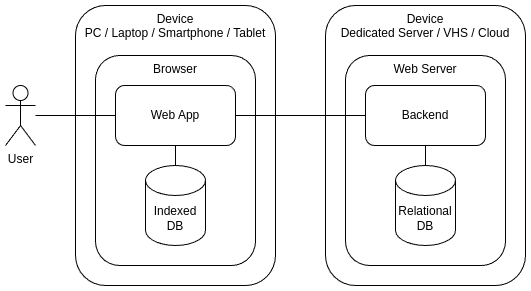
The typical teq-application:
- Stores shared data on the server in a relational database.
- Stores/caches user’s personal data in their browser’s IndexedDB.
- Data processing code is spread across two environments — frontend and
backend.
However, it is not a set of microservices but a modular monolith.
Rather, two modular monoliths assembled from the same packages. Both the
frontend and backend are standalone applications consisting of
individual fragments distributed as npm packages.
I want to emphasize that a Teq application is a web application, not a
set of static pages. It largely disregards SEO requirements. The
platform is designed for building applications that operate in a mobile
phone browser, not for creating server-side pages indexed by search
engines.
## RDBMS and DEM
On the frontend, IndexedDB allows storing heterogeneous data in a single
store, while on the backend, a layer called
[Knex.js](https://knexjs.org/) is used for data manipulation. It’s not a
classic [ORM](https://www.doctrine-project.org/projects/orm.html) but
rather a
[DBAL](https://www.doctrine-project.org/projects/doctrine-dbal/en/4.0/reference/introduction.html)
— it allows working uniformly with different databases (PostgreSQL,
MySQL/MariaDB, SQLite, etc.).
To work with data in relational databases, you first need to describe
the table structures. Since a Teq application is assembled from npm
packages, each npm package contains its own fragment of the shared
database in the form of a JSON file (`etc/teqfw.schema.json`). This file
describes the desired table names, data types in the tables, indexes,
and relationships with other tables. Each Teq application has its own
rules for creating tables in the database needed by the packages
included in the application. These rules are also described in a JSON
file (`etc/teqfw.schema.map.json`). All these JSON files, combined
together, allow building a unified structure (Domain Entities Map) and
using it to create tables in the database and manipulate data. The
transformation of DEM into a data structure is done in the
[@teqfw/db](https://github.com/teqfw/db) package.
This approach allows each npm package to have its own subset of tables
in the relational database and to link its tables with tables from other
packages, taking into account the recommendations of the current Teq
application. In one Teq application, the tables of the `mod_address`
package, for example, may be linked to the tables of the `app_base_user`
package, while in another Teq application, these same tables may be
linked to the tables of the `@vendor/customer` package.
## Code Modifiability
For me, as a developer, the primary goal of developing a web application
at the moment is its
[modifiability](https://flancer32.com/so-what-is-the-ultimate-goal-of-programming-0fd5def59fdc).
The TeqFW platform is based on some principles that help facilitate code
analysis and modification (for example, DI, decomposition of
input-output arguments, [recursive
structuring](https://flancer32.com/recursive-structure-of-js-code-3e9cfb5fb19c)
of JS code,
[AZ-structuring](https://flancer32.com/az-structuring-for-source-code-files-8ae5844696ea)
for source code files, etc.).
For me, the speed of application execution or the volume of information
transmitted over the network is not a priority. I am not concerned at
all that the final application code is in the browser in an open form,
in the form of separate es6 files, rather than in bundles familiar to
everyone. What matters most to me is the ability to quickly recall or
understand what a particular piece of code does and how to modify it to
add new functionality without breaking the existing one. However, since
this is an experimental platform, I can afford not to be too concerned
about backward compatibility. It is sufficient for my applications to
work on fixed versions of platform packages.
## Conclusion
Tequila Framework is an experiment in less common approaches to web
development. Its goal is to develop technologies and tools that let
independent developers build modern web applications from reusable
modules of their own or from the wider community.
At the moment, the following modules can be highlighted, which are in a
more or less ready-to-use state:
- [@teqfw/di](https://github.com/teqfw/di) —
object container with dependency injection.
- [@teqfw/core](https://github.com/teqfw/core)
— Teq plugin scanner (npm packages with integration capabilities into
Teq application) and a wrapper for commander for running Teq
applications in console mode.
- [@teqfw/db](https://github.com/teqfw/db) — Teq
plugin for working with relational databases on the server side,
forming the DB structure based on DEM, wrapper for knexjs.
- [@teqfw/email](https://github.com/teqfw/email)
— [nodemailer](https://www.nodemailer.com/) wrapper.
- [@teqfw/web](https://github.com/teqfw/web) —
nodejs-based web server for serving static files, with the ability to
connect HTTP request handlers. Can be run in HTTP/HTTP2/HTTPS modes.
Wrapper for [ws](https://github.com/websockets/ws).
- [@teqfw/web-api](https://github.com/teqfw/web-api)
— connects a synchronous request handler (POST, GET) to the web
server.
- [@teqfw/web-event](https://github.com/teqfw/web-event)
— connects an asynchronous request handler (SSE) to the web server.
- [@teqfw/web-push](https://github.com/teqfw/web-push)
— for using WebPush API in Teq applications.
- [@teqfw/web-source-installer](https://github.com/teqfw/web-source-installer)
— installation of frontend source files of Teq applications in the
browser cache using a service worker.
- [@teqfw/vue](https://github.com/teqfw/vue) —
wrapper for [Vue 3](https://vuejs.org/) and [Vue Router
4](https://router.vuejs.org/).
- [@teqfw/ui-quasar](https://github.com/teqfw/ui-quasar)
— wrapper for [Quasar UI 2](https://quasar.dev/).
- [@teqfw/i18n](https://github.com/teqfw/i18n)
— wrapper for [i18next](https://www.i18next.com/).
These modules are used in various combinations in my own projects (both
personal and commercial) and are actively being developed. The
[@teqfw/di](https://github.com/teqfw/di) module
can be considered relatively stable.
If anyone wants to participate in this experiment, I will be glad to
answer your questions and help as much as I can.
If you enjoyed this article, please give it a clap and follow me for
more content!
Stay connected:
- [GitHub](https://github.com/flancer64)
- [LinkedIn](https://www.linkedin.com/in/aleksandrs-gusevs-011ba928/)
- [Upwork](https://www.upwork.com/freelancers/~0181de0a64c6981497)
Thank you for your support!