Here, I describe a very simple yet functional console application made using the Tequila Framework platform. The application is used in the autobalta.com store to clean up outdated information from the database that remains after data exchange with external systems, as well as outdated user session data.
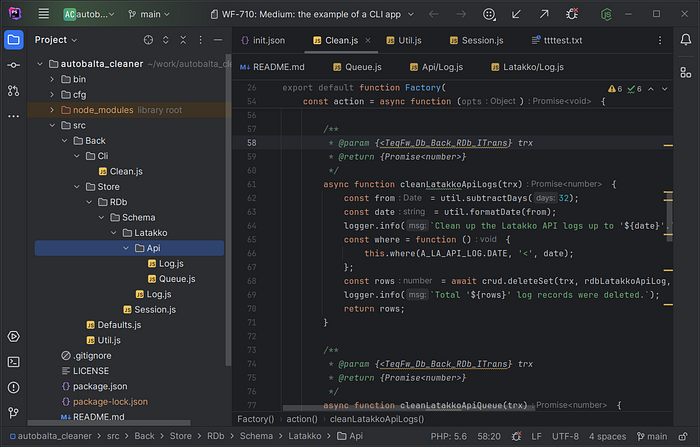
IDE with the project
The primary and sole task of the application is to delete data older than a specified date from the following tables:
- oc_latakko_api_log
- oc_latakko_api_queue
- oc_latakko_log
- oc_session
The application runs daily using a cron job.
package.json
ES6 Module
TeqFW is a platform existing within the npm/nodejs ecosystem. Therefore,
the entry point of the application is the package.json file. Key
points to note:
{"type": "module"}
In teq-applications, TypeScript and transpilation are not used. All source files are ES6 modules.
Dependencies
{
  "dependencies": {
    "@teqfw/core": "0.24.0",
    "@teqfw/db": "0.21.0",
    "@teqfw/di": "0.22.0",
    "mysql": "^2.18.1"
  }
}
Because the platform was under active development, this example fixes the package versions it uses. Their roles are:
- @teqfw/di: The most basic package of the platform, containing an object container that allows loading ES6 modules, creating necessary objects (singletons and transient), and injecting them as dependencies into other objects.
- @teqfw/core: A layer on top of the dependency container that sets the rules for forming and resolving dependency identifiers. It also wraps the commander library.
- @teqfw/db: A layer on top of the knex.js library, allowing (almost) uniform access to different databases.
- mysql: A Node.js driver for MySQL/MariaDB.
Commands
{"scripts": {"start": "node ./bin/tequila.mjs app-clean"}}
The application contains only one command, which is run through npm:
$ npm start
./bin/tequila.mjs
This file is the entry point for all teq-applications in the Node.js environment, and its code is the same for all backend applications:
#!/usr/bin/env node
import {dirname, join} from 'node:path';
import {fileURLToPath} from 'node:url';
import teq from '@teqfw/core';

const root = join(dirname(fileURLToPath(import.meta.url)), '..');
teq({path: root}).catch(console.error);
The main task of the ./bin/tequila.mjs file is to determine the root
directory where the application is located, so that the platform core
script (TeqFw_Core_Back_Launcher from @teqfw/core) can scan the file system
(./node_modules/), find all teq-plugins (npm modules supporting the
@teqfw/di object
container), configure the object container, and create and run the main
application (TeqFw_Core_Back_App), which is a wrapper around the
regular commander (npm package).
Other plugins, including our application, can specify which commands
each plugin adds to commander. In our case, only one command is added —
app-clean.
./teqfw.json
A teq-plugin is a regular npm package with a ./teqfw.json file at its
root, describing the rules for connecting the plugin to the platform.
Each teq-plugin can set its own rules for interaction with other
teq-plugins. Our application is a teq-plugin and interacts with two
other teq-plugins:
- @teqfw/di: Specifies which namespace is used by our application and where the source files are located.
- @teqfw/core: Specifies which commands our application adds to commander.
Here is the descriptor text:
{
  "@teqfw/di": {"autoload": {"ns": "Ab_Clean", "path": "./src"}},
  "@teqfw/core": {"commands": ["Ab_Clean_Back_Cli_Clean"]}
}
Configuration Structures
Interaction rules description structures with plugins:
- @teqfw/di: TeqFw_Core_Back_Plugin_Dto_Desc_Di
- @teqfw/core: TeqFw_Core_Back_Plugin_Dto_Desc
./cfg/local.json
Each plugin may require configuration parameters for its operation. The
teq-application uses one configuration file, common to all teq-plugins.
The platform core (TeqFw_Core_Back_Config) is responsible for loading
and parsing the configuration file. In our application, only one
teq-plugin requires configuration — @teqfw/db:
{
  "@teqfw/db": {
    "client": "mysql",
    "connection": {
      "database": "...",
      "host": "127.0.0.1",
      "password": "...",
      "user": "..."
    }
  }
}
The local configuration description structure follows the configuration parameters for the knexjs library:
- @teqfw/db: TeqFw_Db_Back_Dto_Config_Local
Command ‘app-clean’
When the application starts, the platform core scans all plugin
descriptors ./teqfw.json and initializes the teq-application. In our
case, our plugin @flancer64/autobalta_cleaner
adds one command, which is defined in the script
Ab_Clean_Back_Cli_Clean:
{"@teqfw/core": {"commands": ["Ab_Clean_Back_Cli_Clean"]}}
The result of Ab_Clean_Back_Cli_Clean is a command DTO. The platform
adds each plugin's commands to commander:
const command = fCommand.create();
command.realm = DEF.CLI_PREFIX;
command.name = 'clean';
command.desc = 'Clean up expired data.';
command.action = action;
The realm prefixes commands of the plugin. Here it is app, so
./bin/tequila.mjs app-clean calls the action function.
Database Interaction
Database interaction is provided by the teq-plugin @teqfw/db. Its main role in the platform is to allow assembling a single relational database structure from separate fragments belonging to different plugins, and to allow the teq-application to work with it as a whole. However, in this case, we already have a database external to our application (OpenCart), so it is enough for us to describe in our code the tables and columns we use in our application.
Ab_Clean_Back_Store_RDb_Schema_Latakko_Api_LogAb_Clean_Back_Store_RDb_Schema_Latakko_Api_QueueAb_Clean_Back_Store_RDb_Schema_Latakko_LogAb_Clean_Back_Store_RDb_Schema_Session
Each of these files describes the structure of a separate table:
- oc_latakko_api_log
- oc_latakko_api_queue
- oc_latakko_log
- oc_session
and implements the interface TeqFw_Db_Back_RDb_Meta_IEntity.
Working with the Database
Two main scripts are used to work with the database:
TeqFw_Db_Back_RDb_IConnect: Allows opening connections to the database and initiating transactions.TeqFw_Db_Back_Api_RDb_CrudEngine: Allows performing CRUD operations on individual entities (tables) in the database schema.
Typical code for interacting with the database in a teq-application:
const trx = await conn.startTransaction();
try {
  // Read or change data.
  await trx.commit();
} catch (error) {
  await trx.rollback();
  throw error;
} finally {
  await conn.disconnect();
}
A specific operation (in our case, deletion) is performed like this:
async function cleanSessions(trx) {
  const date = util.formatDate(util.subtractDays(45));
  logger.info(`Clean up the sessions started before '${date}'.`);
  const where = function () { this.where(A_SESS.EXPIRE, '<', date); };
  const rows = await crud.deleteSet(trx, rdbSession, where);
  logger.info(`Total '${rows}' sessions were deleted.`);
  return rows;
}
Note the functional style of performing CRUD operations. All necessary information is passed to the corresponding method of the crud object:
- trx: The transaction within which actions are performed.
- rdbSession: The description of the entity over which actions are performed (metadata).
- where: Additional information depending on the action performed.
Summary
Tequila Framework is a platform for creating JavaScript applications
using technologies typical for enterprise-level languages (like Java,
C#, PHP Zend 1). In particular, teq-plugins use dynamic object linking
through dependency injection during runtime instead of static linking
through import at the code writing level (as seen in the example of the
TeqFw_Db_Back_Api_RDb_CrudEngine interface and its implementation
TeqFw_Db_Back_RDb_CrudEngine). This allows building more complex
applications from individual components, overriding component behavior
depending on application execution conditions, and increasing the
reusability of individual components.
The transition from file module linking (physical addressing) to namespaces (logical addressing) enhances documentation convenience and allows developers to better focus on their application’s architecture, ultimately speeding up project modifications. I hope that after reading this post, you can somewhat imagine the application architecture based solely on logical module names (I intentionally did not link to Github to the corresponding files so you can reverse map the logical name to the file name).
Overall, I am pleased with the result. I am confident that pure JavaScript can be used to create web projects of a scale comparable to platforms like Magento, WordPress, Drupal, Laravel. Considering that browsers do not understand other languages except JavaScript (and a little Web Assembly), this approach has a good chance to surpass the mentioned platforms.
If you are interested in the Tequila Framework platform and have a commercial proposal, I will be happy to develop an application for you at 30 euros/hour. If you have an educational or humanitarian project, I will help you for free.
If you enjoyed this article, please give it a clap and follow me for more content!
Stay connected:
Thank you for your support!